

US Letter Size
A4 Size
One of my favourite ways to practice new lettering styles is by doing the 16 Types of One Letter Challange. Choosing just one letter of the alphabet and drawing it in 16 completely different styles.
But why 16?
The first 4 are easy, 5 to 7 are tricky but manageable, then after 8, I'm often out of ideas and really have to start thinking differently about where to take inspiration from.
It's a great creative exercise to help improve your artistic lettering skills.
Download and print off the PDF sheets and use the free Letter Builder guides to help you construct your chosen letter.
Enjoy!
Ian & Stefan
- - - - - -
Rules:
- Choose 1 letter of the alphabet
- Set a timer for 60 minutes
- Draw your chosen letter in 16 different styles
- Let your creativity take over and have fun!
Need Ideas?
Typestyles:
|
Miscellaneous:
|
|
|
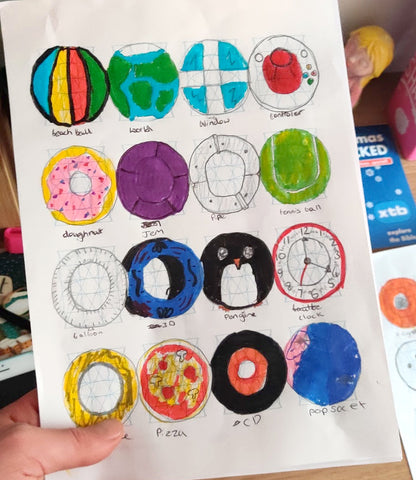
My daughter's (10) sheet of 16 Types of Letter O.
We’d love to see what you create. Be sure to tag your creation on social media with:
#16TypesOf
@stefankunz
@ianbarnard
Made using LetterBuilder tools:
Comments
Camille
Thank you very much Ian, For the freebies and for these very inspiring and interesting assignments ;-)
April 20, 2023
Marine PSM
Thank you so much, Ian, for your goodies and ideas ! It’s Very generous and so usefull ! Kiss from France 😘
July 23, 2020
Tyreece newton
This helped me put my pen to paper been wanting to start hand lettering and I’ve had a hard time this free sheet gave me a place to start thank you for that
July 23, 2020
Vinny
You are amazing, thanks for everything!
July 23, 2020
Deborah Robertson
Thanks for sharing freebies, especially now when people get a bit of cabin fever. Also to add a twist you can look up a random letter picker online to choose a letter for you. Then you can turn it into a game guess what letter will be picked.
April 17, 2020
Leave a comment
Also in Tutorials
How to Outline Lettering in Procreate: A Quick & Perfect Hack
Perfecting outlines around custom lettering in Procreate can often be tedious and uneven. This simple workflow bypasses manual drawing, using adjustments and selection tools to generate crisp, flawless outlines and shadows in under a minute.
How to Make a 3D Lettering Brush in Procreate
Want to add instant depth to your digital hand-lettering? Discover the hidden dual-brush settings in Procreate and learn how to build your own realistic 3D lettering brush from scratch with this simple, step-by-step guide.
7 Procreate Tips That Will Take Your Digital Art to the Next Level
Master these 7 little-known Procreate features to speed up your digital art workflow, from fixing messy colour drops to setting up an external studio monitor.